
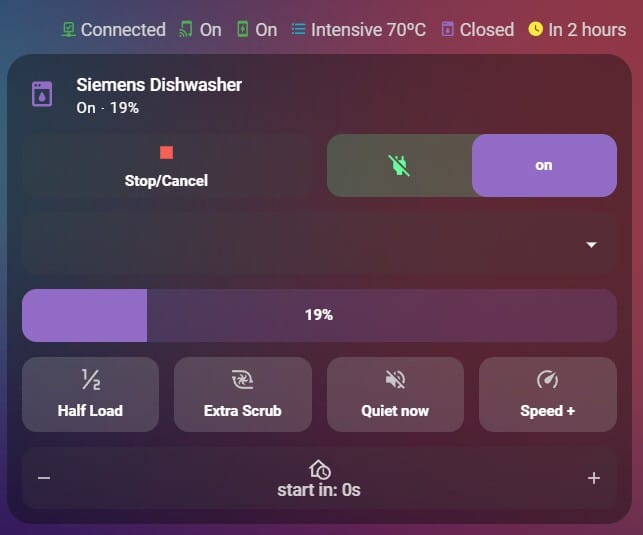
Siemens dishwashers actually give us a ton of great data, but in a standard setup, those controls are not very intuitive. You often have to click through three different menus just to start a simple wash! Most of the default options are either a wall of text or a clunky set of entities that stick out like a sore thumb against a clean, modern UI.
If you’re a fan of the Mushroom aesthetic, you know the struggle of trying to keep that minimalist, rounded look while keeping functionality unaffected. I finally managed to bridge that gap with the use of custom-card-features. It’s exactly what I needed to create a high-functioning Dishwasher control card and a status card that both look like they belong on a premium dashboard.
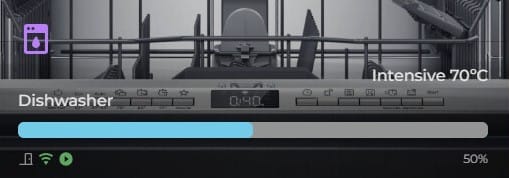
So here are the features:
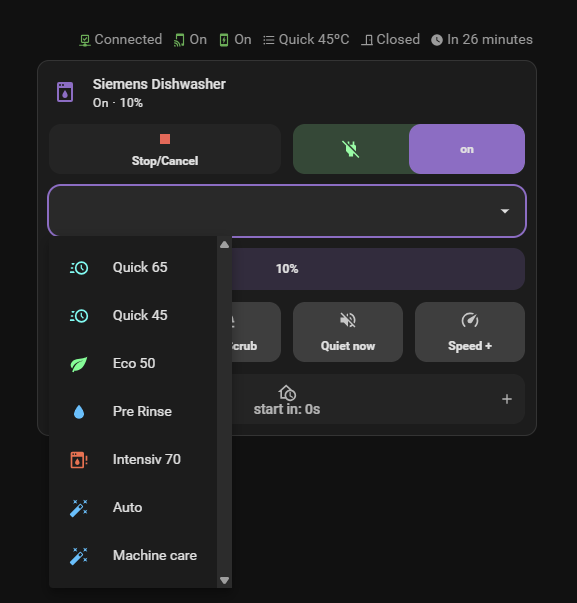
- Quick Stop/Cancel: A big, clear button to stop the machine if you forgot a spoon!
- Easy Option Toggles: Simple switches for Half Load or Extra Dry—no more digging through settings.
- Program Selectors: A handy dropdown to pick between Eco, Auto, or Speed modes in a split second.
- Status Badges: Little icons at the top that show if the machine is online and—most importantly—if you remembered to enable Remote Start on the dishwasher itself.
- Delay Start (+/- ): Instead of a clunky slider, I used a plus/minus toggle. This lets you precisely click through the hours to delay your start time
- Visual Progress Bar: A clean bar that fills up as the dishes get cleaner, so you know exactly how much time is left at a glance.